
You’ve never planned a wedding before. Paige has.
Tell Paige about your wedding. You get a budget that adds up, the vendors you actually need, and the first emails to them drafted. Paige watches what comes back and keeps your plan current.
- Free to join
- No account needed
- Leave any time

Five quick answers
Photography · $6,800
7 categories, not 14
Book the photographer

Everyone has an opinion about what your wedding should cost. None of them have seen your budget.
A photographer quotes you a number and you have no idea whether it is fair. Every list online has fourteen vendors on it and your venue already does four of them. The spreadsheet your friend swears by was built for a wedding that is not yours. Paige starts from your wedding, not the average one.
A checklist tells you what to do. Paige works out what it costs and who to ask.
Not the national average split across fourteen categories. Your maximum, divided by what you told Paige matters, with the reasoning under each number so you can argue with it.
Your plan, as Paige builds it
$45,000 of $45,000
A plan by the end of the afternoon
Tell Paige the basics
Your date, where it is, roughly what you can spend and how many people. Whatever is still undecided has a say-so option, because most of it is undecided at this point.
Answer five questions
What you would splurge on, what you would skip, the feel you are after. Five, with a running total that moves as you answer, so you can see what each choice costs before you commit to it.
Send the first emails
Paige works out your budget split and the vendors you actually need, then drafts the first email to each one. You read them, change anything, and send.
The part that keeps working after you close the tab
A plan is only true on the day you make it. Vendors reply, prices move, dates shift. Paige reads what comes back so your plan is still right in March without you rebuilding it.
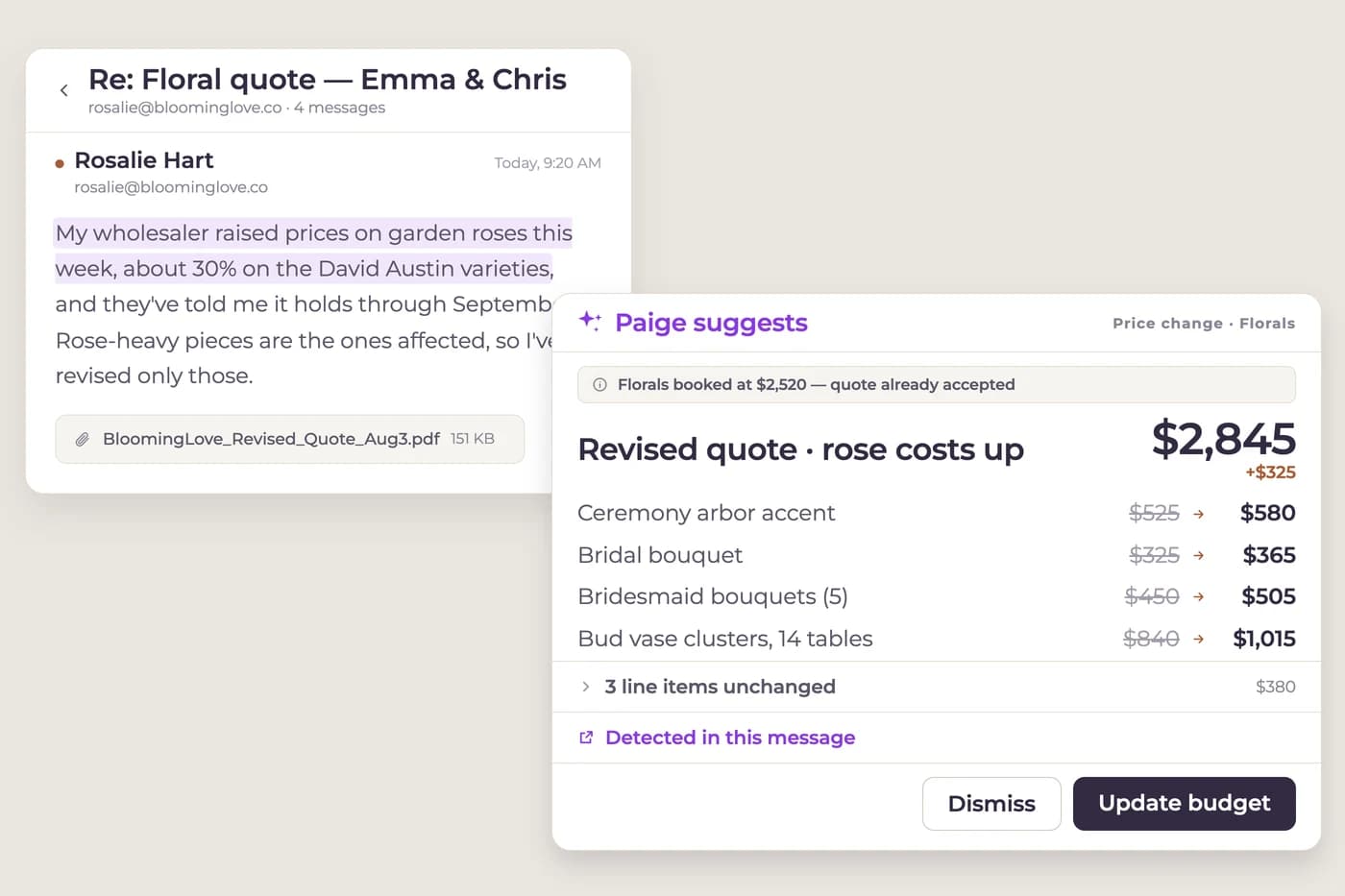
Your florist just changed the price. Paige already caught it.
Connect the vendor threads you want Paige to watch. When a price changes, a deposit clears, or a deadline moves, Paige flags it against your plan and suggests the update. You review, approve, done. Nothing gets buried, and nothing happens without you.
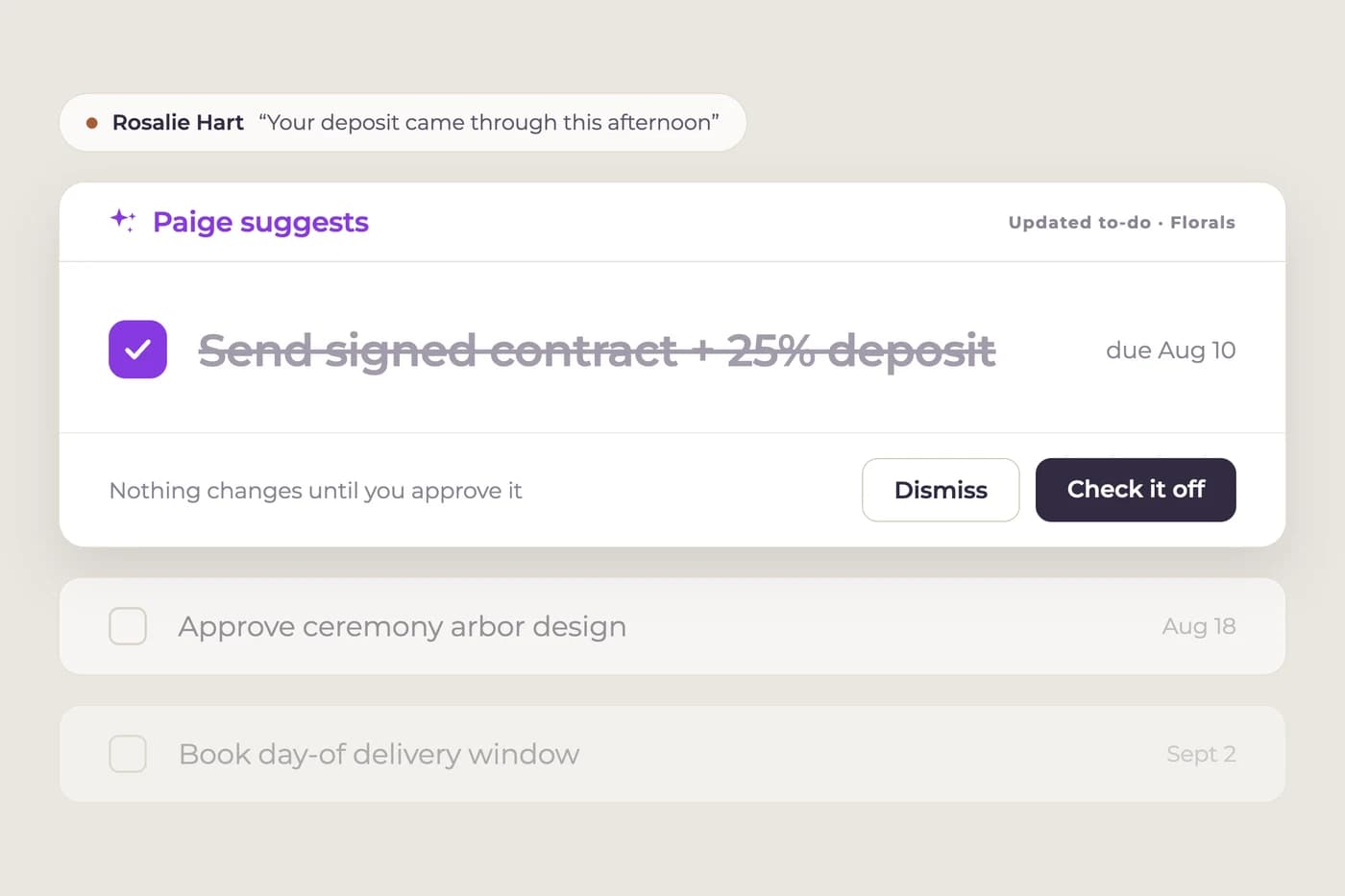
Deposit confirmed. One tap, task done.
The same monitoring that catches price changes keeps your to-do list honest. When a vendor email completes a task, Paige suggests the check-off. You approve, and the list stays real without you maintaining it.
Connect Gmail and the vendor replies come to your plan
No new address to give vendors, no forwarding rules, no app for them to sign into. They reply to you the way they always would, and Paige reads what arrives.
 Gmail
 Google Calendar
Only the threads you start here
Paige watches the vendors you contacted through Paige, and nothing else. The rest of your inbox is not read, not indexed, and not touched.
Nothing sends without you
Every email is a draft until you press send. Paige never archives, never deletes, and never replies on your behalf.
Disconnect whenever
One click and the connection is gone. Your plan, your budget and your vendor list stay exactly as they were.
When you’re ready, there’s more.
None of this is required to get a plan out of Paige. It’s here when you want it.
“Mark the florist deposit as paid.” Done.
Describe what happened, or what you need. Review, approve, and move on. No menus, no clicking through screens, just the way you’d tell a person.

Paige started as a wedding planning tool for exactly one wedding. Its founders’ own.
Dave built it because Michelle was drowning in the admin of planning theirs. A year and a half later it had become Paige, and it has been in the hands of professional wedding planners since. This is that same engine, pointed at one wedding instead of thirty. Yours.
The couples version is new, so you would be among the first. That is why it is free, and why we actually read what you tell us.

Dave & Michelle, on their own wedding day
Frequently asked questions
- No. Paige only watches the threads with vendors you have contacted through Paige. Nothing else is touched, and nothing sends, archives, or deletes without you.
- No. Paige flags and suggests. Every change to your budget or your to-dos is approved by you, and emails only go out when you hit send.
- Never. Drafts wait for you. Emails only go out when you click send.
- No. Paige is built on a model of how weddings actually work: vendors, budgets, timelines, and how they connect. That is why Paige can tell you what a price change means for the rest of your plan instead of just summarising an email. And unlike a chatbot, nothing Paige suggests happens until you approve it.
- Yes, once Paige opens. Give Paige your date and answer five questions, and you will have a budget split and a vendor list before you connect any email at all. Connecting comes later, when you are ready to start contacting people. Paige for couples is not open yet, so for now joining the waitlist is all there is to do.
- Yes. You both get access to the same plan, so there is no forwarding screenshots back and forth and no version that is more up to date than the other one.
- That is fine. Paige is not trying to replace one. Your plan, your budget and your vendor list are yours either way, and a planner coming in later starts from something rather than from nothing.
- Paige drafts each one in the tone you pick, warm, formal, concise or firm, with your date, guest count and budget already in it. You edit and send.
- Gmail is what Paige connects to today. You can still use everything else, including the budget, the vendor list and the drafted emails, and send them from wherever you like. More providers are coming.
- Only to do the job you connected it for: reading the vendor threads you point Paige at, and writing drafts you approve. Your data is never used to train models and never sold. The privacy policy has the full detail.
- Nothing while the couples product is in beta. No card, no trial clock. We will tell you well before that changes.
Free when it opens
Free to start. We’ll tell you long before that changes.
Paige for couples opens soon, and everything here is free to start when it does. No card, no trial counting down, nothing to cancel.
- Your budget, split and explained
- The vendors you actually need
- First emails drafted for each one
- Paige watching the replies
- Everything on your phone
Takes one field. We’ll email you the moment it opens.